How to create Crystal Reports installer using Merge Modules
Crystal Reports utilizes merge modules to ensure accurate installation of report components and assemblies within your deployment project. A merge module comprises a collection of components that are merged with a Windows installer, specifically designed for applications requiring these components. The subsequent steps outline the process of creating a setup file for client-side installation of Crystal Reports, employing Merge Modules.
Before creating a setup project, make sure that the following files exist in the \Program Files\Common Files\Merge Modules folder.
- CrystalReportsRedist2005_x86.msm
- Microsoft_VC80_ATL_x86.msm
- policy_8_0_Microsoft_VC80_ATL_x86.msm
Steps to create Setup file
1) Make sure the above mentioned files are in the \Program Files\Common Files\Merge Modules folder , If the files are not there you can download the file and copy it to the folder \Program Files\Common Files\Merge Modules .
Download: https://www.sdn.sap.com/irj/scn/weblogs?blog=/pub/wlg/11688
2) Open your Visual Studio
3) Select "New Project" from File menu.
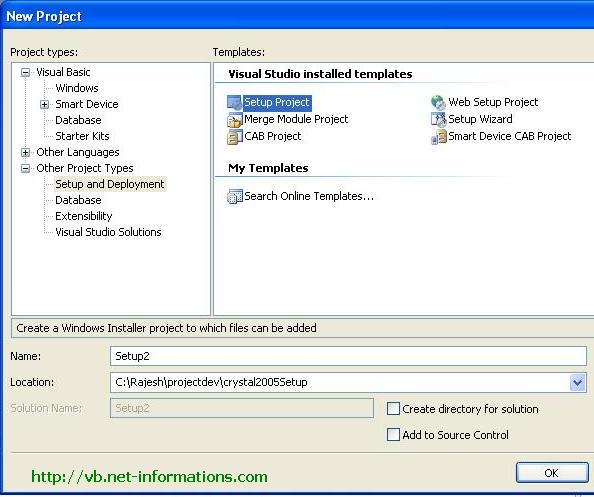
4) Select "Setup and Deployment" from "Other Project Types"
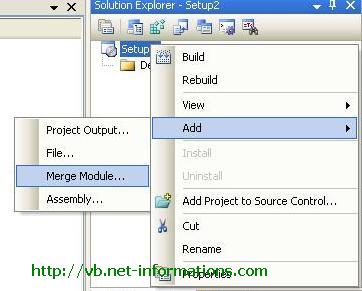
5) In the "Solution Explorer", select your setup project, right-click, and select Add and Merge Module from the menu.
6) Select CrystalReportsRedist2005_x86.msm to your setup project.
The file available at \Program Files\Common Files\Merge Modules 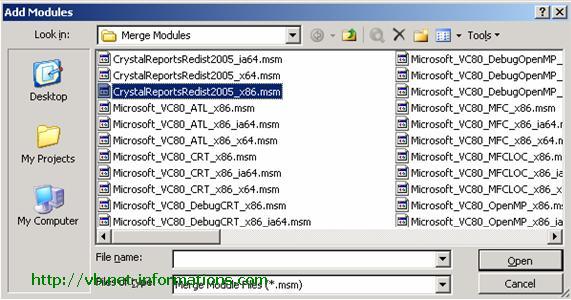
Then you can see Microsoft_VC80_ATL_x86.msm and policy_8_0_Microsoft_VC80_ATL_x86.msm will be automatically added in the Detected Depencies section.
7) Build your project.
Now you will get the setup file for distribution. Either you can add this setup file to you application installer or distribute it as a separate setup file.
- Sample Database and tables for Crystal Reports tutorials
- Step by Step help for creating a simple Crystal Reports in VB.NET
- VB.NET Crystal Reports from multiple tables
- VB.NET Crystal Reports String parameter
- VB.NET Crystal Reports Integer parameter
- VB.NET Crystal Reports Date parameter
- VB.NET Crystal Report Load Dynamically
- VB.NET Crystal Reports Formula Fields
- VB.NET Crystal Reports Summary Fields
- VB.NET Crystal Reports Export to PDF
- VB.NET Crystal Reports Export to Excel
- Email a Crystal Reports from VB.NET
- Crystal Reports Without Database
- Crystal Report from SQL Query String
- Dynamic Crystal Reports from SQL Query String
- Crystal Reports from XML File
- Create a Subreport in Crystal Reports
- Create a Subreport in Crystal Reports with Link
- How to deploy Crystal Reports on Clinet Machine