Create a Subreport in Crystal Reports with Link
In the preceding section, we discussed the process of incorporating Subreport in Crystal Report, where the subreport is inserted directly within the main report. However, in this section, we will focus on creating on-demand subreports that are represented by a hyperlink within the main report.
Here, our objective is to generate a subreport that is triggered and displayed only when the user clicks on the designated hyperlink. This approach offers a dynamic and interactive element to the Crystal Reports, as the subreport will be presented in response to user interaction.
By implementing on-demand subreports, we can effectively manage the report's visual complexity and optimize user experience. The main report will contain a link that, upon activation, will trigger the display of the corresponding subreport, allowing users to access additional information or details as per their specific requirements.
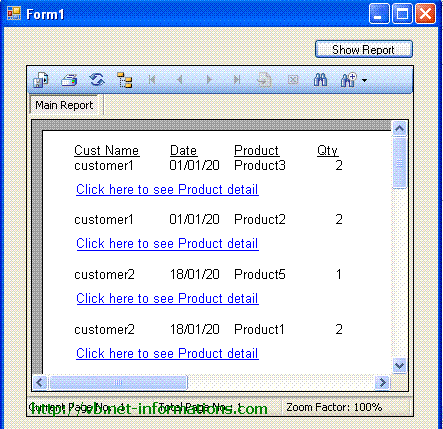
Here we are using our previous example Subreport in Crystal Report and make a link in the min Crystal Reports for on-demand subreport.
Select the subreport object in the Crystal Reports and right click , then select Format Object.
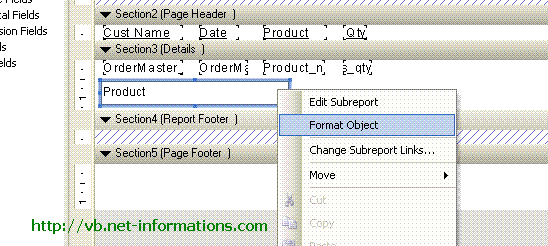
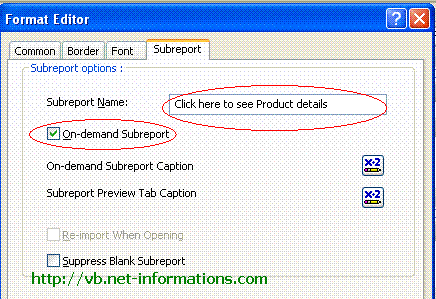
After adding the subreport to your Crystal Reports, you will access the Format Editor. Within the Format Editor, navigate to the Subreport tab. Here, you will find a checkbox labeled "On-demand Subreport." Selecting this checkbox will transform the subreport into a link within your main Crystal Reports.
If desired, you can modify the title of the subreport by editing the text within the "Subreport name" textbox. This allows you to customize the display of the subreport link to align with your specific requirements or desired labeling.
Once you have made the necessary adjustments, click the OK button to save the changes and exit the Format Editor.
Now the designing part is over and you are ready to generate subreport on-demand. Next step is to select the default form(Form1.vb) and add a Button and Crystal Report Viewer to the Form.
Put the following vb.net source code in your form and run the program .
Full Source VB.NET- Sample Database and tables for Crystal Reports tutorials
- Step by Step help for creating a simple Crystal Reports in VB.NET
- VB.NET Crystal Reports from multiple tables
- VB.NET Crystal Reports String parameter
- VB.NET Crystal Reports Integer parameter
- VB.NET Crystal Reports Date parameter
- VB.NET Crystal Report Load Dynamically
- VB.NET Crystal Reports Formula Fields
- VB.NET Crystal Reports Summary Fields
- VB.NET Crystal Reports Export to PDF
- VB.NET Crystal Reports Export to Excel
- Email a Crystal Reports from VB.NET
- Crystal Reports Without Database
- Crystal Report from SQL Query String
- Dynamic Crystal Reports from SQL Query String
- Crystal Reports from XML File
- Create a Subreport in Crystal Reports
- How to deploy Crystal Reports on Clinet Machine
- How to create Crystal Reports installer using Merge Modules